
Visitor Management System

Each day, thousands of visitors enter offices, buildings, and organizations, yet they are greeted only with a logbook to record their details.

In this digital age, this outdated process is a problem. It reveals a security gap, suggesting we are not as professional as we appear.

A modern visitor management system is the need of the hour to improve the overall visitor experience. Regardless of whether you have a single office or a multi-location enterprise, it replaces the paper trail with a digital experience. Gain full visibility into who’s in your building, when they arrive and leave, and the purpose of their visit.

This blog covers everything you need to know: what a visitor management system is, how it works, the features to look for, and how to choose the best visitor management system.


Key Takeaways

  • A visitor management system automates the entire visitor lifecycle, starting from pre-registration to check-out.
  • Modern systems offer cloud, web, on-premises, and mobile options that suit various organizational setups.
  • Key features include, but are not limited to, contactless check-in, ID scanning, real-time host notifications, watchlist screening, and audit logs.
  • Industry-specific solutions address the unique needs of offices, hospitals, enterprises, and building complexes.
  • Compliance with GDPR, HIPAA, and other data compliance frameworks is built into most visitor management solutions.
  • The future of visitor management revolves around AI screening, facial recognition, IoT integration, and predictive analytics.


What is a Visitor Management System?

Visitor Management System

A visitor management system (VMS) is a digital platform that records the movement of visitors entering and exiting a facility or building. It replaces traditional paper sign-in sheets with automated data-driven workflows.

Think of it like an end-to-end system that covers every stage of a visitor’s journey into your enterprise. It can capture everything – From a visitor’s pre-arrival registration to storing their data post-visit.

A visitor management system can run as a cloud-based platform, a web portal, a mobile app, or an on-premise system. This depends on the deployment mode you choose.

At its core, it serves as a digital paper trail for who is on your premises at any given minute.

Why Organizations Need Visitor Management Today?

Organisations have changed drastically. Regulations on data and physical security have increased. Visitor contact information needs to be captured securely. Organisations also need to adhere to building occupancy limits.

Moreover, the post-COVID era means hybrid models, and the reception desks may be unstaffed for a few hours. All of these stringent rules signal the need for a proactive visitor management solution. One that screens visitors before they arrive, notifies hosts the moment a guest checks in, and maintains a tamper-proof audit trail for compliance.

Problems With Traditional Sign-In Methods

Traditional sign-in methods involve a visitor’s book, where visitors write their names and details. This poses a significant risk, as every new arrival could view the previous visitor’s details. In effect, it leads to a serious GDPR and HIPAA violation.

  • Other drawbacks of the traditional method include:
  • Visitor details can be easily modified
  • Provides no real-time alerts
  • No audit trail
  • No integration with access control or HR systems.
  • Absence of watchlist screening

Evolution From Logbooks to Automated Visitor Management System

The transition from logbooks to an automated visitor management system was gradual.

The first move was towards Digital sign-in tablets. This was followed by pre-registration via email invite, allowing visitors to complete details before their arrival. The latest evolution is an automated visitor management system. This system integrates with Active Directory, Access Control Systems, HR platforms, and CCTV infrastructure. Visitor Entry is thus an integrated workflow instead of a Standalone Reception Process.


Difference Between Visitor Management System and Visitor Tracking System

Both these terms sound familiar and are used interchangeably. On the contrary, each refers to distinct capabilities.

A visitor management system handles the full range of administrative and security functions, including pre-registration, check-in, badge printing, host notification, and check-out. A visitor tracking system or visitor tracking app focuses on monitoring visitors’ locations within the organization in real time. They would often  be using RFID badges or  QR codes.

In practice, the best visitor management system software comprises visitor tracking capabilities as a core module. This gives security teams a live dashboard of everyone on the premises and alerts them if a visitor enters a restricted area or stays beyond their assigned time window.


How a Visitor Management Software Works?
Visitor Management System

Core Components of Visitor Management Software

Breaking down the visitor management software development into its core components:

  • A digital front-end (kiosk, tablet, or web portal) for visitor self-service
  • A back-end database for storing visitor records
  • An integration layer that connects with access control, HR, and communication systems
  • Reporting and analytics engine for visitor insight.

Step-by-Step Visitor Check-In Process

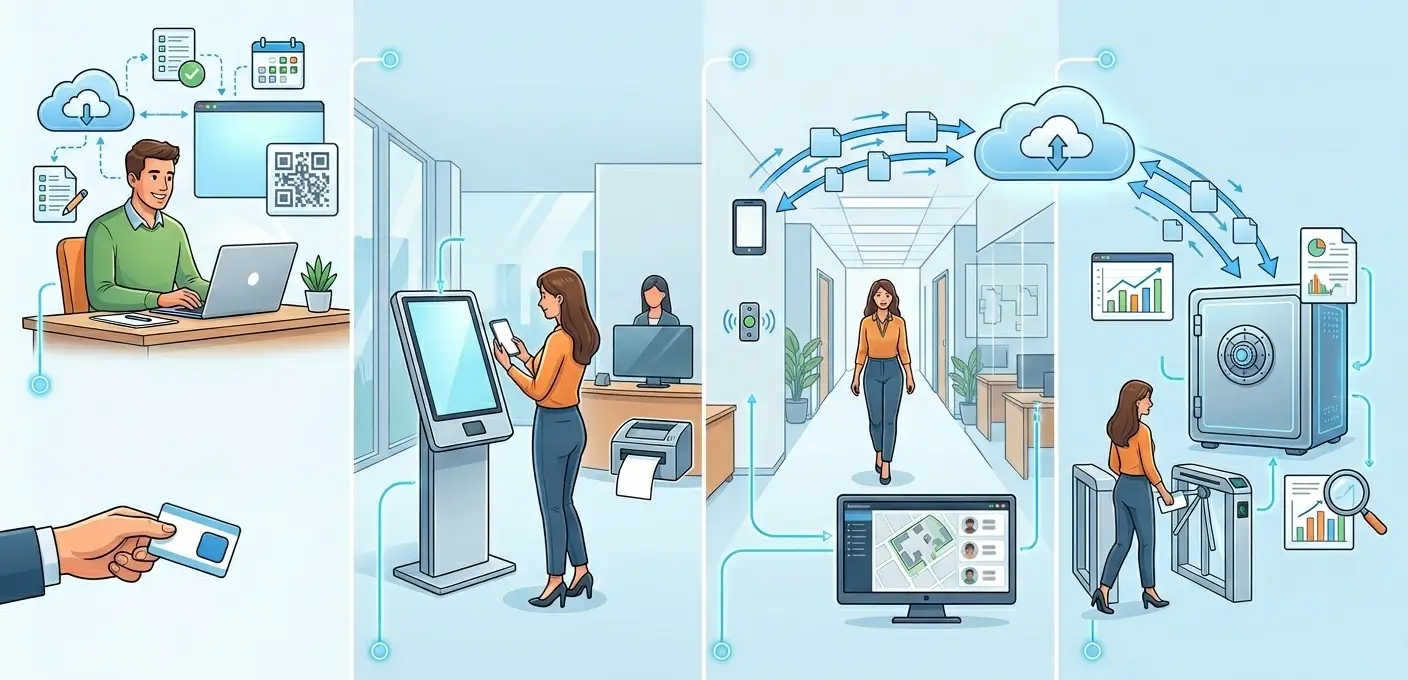
The check-in process begins with a pre-registration invite sent by the host. The visitor then receives a QR code or PIN by email. On arrival, they scan their code at the self-service kiosk, upload or scan their ID, review and sign any required NDAs or safety documents.

They then receive a printed or digital badge- a temporary identification pass after checking in. The host receives notifications via SMS, email, or messaging tools when the visitor enters.

Visitor Check-Out and Exit Monitoring

It is worth noting that check-out is just as important as check-in. On leaving, the visitor scans their badge at the exit terminal. Their departure is timestamped, and their visit is recorded as closed. Any visitor who remains beyond their scheduled time is flagged and alerted to security teams.

How Visitor Data Is Captured and Stored

Visitor data is captured through multiple touchpoints. The first being pre-registration forms, ID scanning, biometric verification (in advanced deployments), and kiosk interactions. This data is encrypted, both in transit and at rest. It is then stored in compliance with applicable regulations (GDPR, HIPAA) and subject to configurable data retention policies. Sensitive fields such as ID numbers are typically masked after the visit is completed.

Real-Time Host Notifications and Alerts

One of the highlighted features in any visitor management system is real-time host notification. The moment a visitor completes their check-in, the system pushes an alert to the host via their channel of choice -email, SMS, Slack, Microsoft Teams, or a dedicated visitor tracking app. Reception staff need not manually call hosts to inform them of a visitor’s arrival. This also ensures no visitor is left waiting in the lobby.

Integration With Access Control and Security Systems

A security visitor management system is efficient, but it becomes truly powerful when it’s connected to existing infrastructure. Integration with access control systems allows the VMS to grant/ restrict badge access based on the visitor’s profile. Integration with CCTV systems enables cross-referencing of visitor records with camera footage. Integration with Active Directory or LDAP enables hosts to be identified and notified without manual data entry.


Types of Visitor Management Systems

Cloud Based Visitor Management System

These types of Visitor Management Systems are hosted on remote servers and can be accessed through the internet. Since it requires no additional on-site server infrastructure and is automatically updated, it is now the most popular choice for modern organizations.

Web Based Visitor Management System

A web-based visitor management system runs entirely in a browser. No software installation is required. Administrators manage the system from any device, and visitors can pre-register via a web link. This model is ideal for organizations with distributed IT teams.

Online Visitor Management System for Remote & Distributed Workplaces

An online visitor management system supports organizations that require visitors to check in remotely before arriving on-site. This is especially relevant for hybrid workplaces, where visitor volumes keep fluctuating, and a staffed reception is not always available.

On-Premise Visitor Management System Software

For organizations with strict data compliance requirements, such as government agencies, defense contractors, and highly regulated industries, an on-premise visitor management system software stores all data within the organization’s own infrastructure. While more expensive to maintain, it offers the highest level of data control. These types of VMS are preferred in environments where cloud connectivity is restricted


Don’t Wait for a Security Incident to Act – Build Your Visitor Management System Now


Mobile Visitor Management System App

A visitor management system app extends the capabilities of the core platform to smartphones and tablets. Security officers can verify visitor identities on the go, and hosts can approve or deny access from their mobile apps. Managers can monitor real-time visitor dashboards from any location.

Electronic Visitor Management System (Paperless)

An electronic visitor management system eliminates paper usage. A paperless enterprise, with no sign-in sheets, no printed NDAs, and no handwritten badges. All documents would be signed digitally, badges printed on demand, and records would be stored electronically. This approach considerably reduces administrative overhead and makes audit trails easier to maintain.

Automated Visitor Management System

An automated visitor management system handles the end-to-end visitor workflow with minimal human intervention. All processes happen without a receptionist present. Automation reduces errors and improves the visitor experience. The front-desk staff can now focus on higher-value interactions.

Enterprise Visitor Management System

If your organisation has multiple locations and  a huge number of daily visitors, along with strict compliance requirements, then look no further , the enterprise visitor management system is for you. Key enterprise capabilities include centralized administration across all sites, role-based permissions, single sign-on (SSO) integration, advanced analytics, and dedicated SLAs.


Key Features of Visitor Management System Software

A visitor management system can be customised to your needs. The following are the key features observed:

Digital Pre-Registration & Appointment Scheduling

Digital pre-registration can significantly reduce check-in time to under 30 seconds on arrival. Hosts can invite visitors via a link in the system beforehand. By clicking on the link, Visitors can complete their details, upload required documents, and receive a unique QR code. All of this happens even before they set foot in the building.

Contactless Self-Service Check-In Kiosks

This feature gained popularity during the covid era. Self-service kiosks let visitors check in independently. Touchless options include QR code scanning, facial recognition, or voice interaction. They are now the standard, particularly in healthcare and high-traffic facilities where hygiene is a priority.

ID Scanning & Badge Printing

ID scanning can extract data from documents in a second, whereas Instant Badge printing provides a professional identity  marker that security can view at a glance and access control systems can read electronically.

Visitor Tracking System Dashboard

With notifications for unusual activity, the real-time dashboard displays who is present, who they are visiting, where they can go, and how long they have been there.

Visitor Tracking App for Security Teams and Hosts

Security can use a mobile app to scan badges, confirm IDs, and promptly alert hosts when guests arrive.

Watchlist Screening & Background Verification

Risky visitors are flagged by watchlist screening and background checks, which can prevent or escalate access prior to check-in.

NDA & Document Signing at Check-In

During check-in, guests can digitally sign safety documents and NDAs to provide a paperless audit trail.

Multi-Location & Multi-Site Management

Multi-site management enables centralized control with location-specific workflows and aggregated reporting.

Role-Based Permissions

System access is restricted by role-based restrictions based on user responsibilities.

Audit Logs, Reports & Compliance Records

Every action is documented in audit logs for regulatory reporting and compliance.

Integration With HR, Wi-Fi & Communication Tools

Operations are streamlined, and manual work is decreased through integrations with communication tools, Wi-Fi provisioning, and HR systems.


At Experion Technologies, development teams have designed and deployed security-focused Visitor Management System solutions that integrate with various systems, so nothing slips through the cracks.


Security Visitor Management System Capabilities
Visitor Management SystemSecurity VMS is like any VMS, but with a stronger focus on security features.

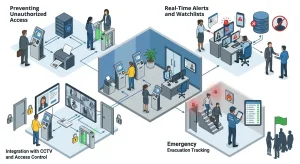
  • Preventing Unauthorized AccessThe first line of protection against illegal facility entry is a security visitor management system. The system ensures only those with permission enter sensitive locations by requiring pre-registration, ID verification, and watchlist screening before each visitor is issued a badge. When a visit concludes or a security alert is raised, access may be automatically terminated.
  • Real-Time Alerts and WatchlistsInternal watchlists of people who have been banned or reported can be kept up to date by security staff. The technology instantly notifies security staff via the visitor tracking app, email, or SMS when a visitor’s information matches a watchlist entry made during check-in. This enables them to stop or reroute the visitor before they enter the building.
  • Real-Time Alerts and WatchlistsInternal watchlists of people who have been banned or reported can be kept up to date by security staff. The technology instantly notifies security staff via the visitor tracking app, email, or SMS when a visitor’s information matches a watchlist entry made during check-in. This enables them to stop or reroute the visitor before they enter the building.
  • Integration With CCTV and Access ControlThe visitor management system can link visitor photos taken during check-in to CCTV footage when coupled with CCTV systems, enabling quick identity verification in the event of an incident. A visitor’s physical badge can be programmatically enabled or disabled in the VMS based on their visit status, thanks to integration with access control systems.
  • Emergency Evacuation TrackingSecurity personnel must be aware of every person in the facility, including guests, in the event of a fire alarm or lockdown. Any device, including the mobile visitor tracking app, can access the instantaneous, real-time headcount generated by the visitor management system. In place of the disorganized paper-based headcount procedure, floor wardens can digitally mark visitors as accounted for.


Benefits of Visitor Management System

Trying to convince your staff of the benefits of adopting a visitor management system? The advantages are numerous:

  • Enhanced Security & Unauthorized Access Prevention: Reduces the risk of unauthorised individuals entering the facility. Digital records cannot be tampered with, unlike digital logbooks.
  • Faster Check-In and Better Visitor Experience– Pre-registration and self-service kiosks help reduce the average check-in time.
  • Reduced Front Desk Workload- The system frees the front desk staff from repetitive tasks, allowing them more time to focus on hospitality.
  • Real-Time Visibility of People on Premises-The visitor tracking system dashboard provides a live view of every visitor in the building.
  • Compliance & Data Privacy Protection-Digital records with encrypted storage make it much more straightforward to demonstrate compliance with GDPR, HIPAA, and other applicable data regulation frameworks.
  • Emergency Evacuation Management-In case an emergency breaks out, rest assured that each visitor is accounted for. With Real-time headcounts and zone-based visitor tracking, VMS streamlines emergency evacuation.
  • Operational Cost Savings- Reducing paper usage and reducing reception staffing needs improves cost savings.
  • Professional Brand Image- A sleek visitor management system indicates attention to detail and a good brand image.
  • Scalability for Growing Organizations– Enterprise and cloud-based visitor management systems can grow horizontally, incorporating new users, locations, and connectors without requiring architectural changes. Your guest management system grows alongside your company.


Industry-Specific Visitors Management System

Office Visitor Management System

The visitor management system for office prioritizes speed, integration with employee directories, and a branded visitor experience. Some use cases include scenarios where a client visits, a candidate checks in for a job interview, or contractor management. By integrating with Outlook Mail or Google Calendar, meeting invites can automatically trigger visitor pre-registration.

Healthcare Visitor Management System

Infection control, patient privacy, and regulatory compliance must all be balanced in a healthcare visitor management system. Standard criteria include HIPAA-compliant data handling, time-window limitations, health declaration screening, and visitor limits per patient. In settings where infections are a concern, contactless check-in minimizes touchpoints.

Visitor Management System for Hospitals

By enabling ward-level access control, patient-visitor relationship verification, and interaction with hospital information systems (HIS), the visitor management system for hospitals enhances healthcare capabilities. Without the need for nursing staff to manually intervene, the system can automatically impose hard limits on visitor numbers during infectious disease outbreaks or visiting hour restrictions.

Enterprise Visitor Management System

An enterprise visitor management system provides centralized governance for decentralized operations at major enterprises that handle visitors across dozens of international locations. While location managers are permitted to alter workflows within predetermined bounds, administrators establish enterprise-wide standards. Patterns that would not be obvious at the site level are revealed by consolidated analytics across sites.

Building Visitor Management Systems

These types of VMS are ideal for real estate complexes, gated communities, mixed-use developments, and university campuses. Building visitor Management systems are commonly seen in buildings with numerous tenants, a variety of visitors, and strict access zones. Delivery staff, contractors, residents’ visitors, and event attendees must all be managed by these systems through separate workflows coordinated from a single platform.


Compliance and Data Privacy in Visitor Management System

1. GDPR Requirements

Under GDPR regulations, organizations must obtain explicit consent before collecting visitor data, disclose how that data will be used, and delete it upon request. For a visitor management system to be GDPR Compliant, it must present a consent notice at check-in, capture digital consent, store data only for the defined retention period, and provide tools for efficiently handling data subject access requests (DSARs). GDPR requirements are primarily enforced in the EU.


Build Your Custom VMS with Experion. Click to Get Started.


2. HIPAA in Healthcare Visitor Management System

Healthcare facilities subject to HIPAA must ensure that visitor data  is handled with strict confidentiality.  Especially if it is any information that could identify a patient or their condition. The visitor management system must enforce role-based access and encrypt all stored and transmitted data. In addition, it must maintain audit logs that demonstrate compliance with regulators. HIPAA mostly applies to US-based organisations.

3. Visitor Consent & Data Retention Policies

Best-practice deployments configure automatic data purging after a defined retention window. This is commonly done after 30, 90, or 180 days.

Visitor records are usually anonymized or deleted during purging.

4. Handling Data Breaches

Data breach risks are minimized through encryption, access controls, and minimal data collection. In the event of a breach, audit logs enable organizations to determine precisely which records were affected. In the event of a data breach, it must be reported. This is a critical requirement under GDPR’s 72-hour reporting obligation.


How to Choose the Best Visitor Management System?

Choosing the best visitor management system from the wide variety of choices available in the market is no easy task. Here are some factors to consider.

  • Assessing Security vs Volume Needs

Is yours a high-security, low-volume facility, such as a data center or government office? Or is it a high-volume, medium-security environment like a corporate headquarters?

Start by identifying your security requirements against your visitor volume.  If your Security requirements are high, this would require feature selection, whereas volume would need you to prioritize infrastructure and scalability.

  • Required Integrations (HR, Active Directory, Wi-Fi)

Visitor Management software does not work as a standalone system; it must be integrated with HR platforms for employee host lookup, Active Directory for SSO, Wi-Fi provisioning for guest network access, and communication tools for host notifications.

A lack of integration options is what forces most organisations to switch vendors.

  • ROI of Visitors Management Software

The Return On Investment (ROI) of visitor management software comes from multiple ways: Reduced front-desk staffing costs, eliminated paper and badge resources, faster compliance reporting, and avoided costs from security incidents. Model the ROI across a 3-year horizon and account for scaling to multiple sites to build a compelling business case.

  • Scalability & Enterprise Readiness

Confirm if the platform can expand with you. Multi-site support, API availability for custom integrations, SLA commitments, and the vendor’s experience with enterprise clients of similar scale and complexity are important indicators of scalability.

  • Common Buying Mistakes

The most common mistake buyers make is underestimating the complexity of integration. During the evaluation process, they often neglect to involve security and IT. Another mistake is that buyers often fail to plan hardware procurement and estimation of installation timelines. A workaround is to run a structured pilot test at any one location before a full rollout across all locations.


Implementation Best Practices for Building Visitor Management Systems
Visitor Management System

  1. Hardware Setup (Kiosks, Tablets, Badge Printers)

The choice of hardware is just as crucial as the choice of software. Kiosks with sufficient privacy screens ought to be placed at main entry points. Although tablet-based deployments are flexible, they need infrastructure for safe installation and charging. Before being deployed, badge printers should be evaluated for speed and print quality. Bottlenecks are avoided in high-volume facilities by having redundant hardware  at every station.

  1. Staff Training & Adoption Strategy

Security teams and reception employees must be well-versed in the system to use it confidently and assist guests who encounter problems. Adoption is accelerated, and change resistance is reduced through role-specific training sessions, fast-reference cards at kiosks, and a designated internal champion at each location.

  1. Monitoring & Visitor Analytics Usage

Review visitor metrics on a regular basis after deployment, including peak check-in timings, average visit duration, frequency of watchlist alerts, and check-in failure rates. These indicators help senior leadership assess the system’s security value, identify operational inefficiencies, and guide personnel decisions.

  1. Change Management Challenges

The most prevalent sources of resistance are visitors who prefer paper forms and long-tenured receptionists who are accustomed to the current procedures. To address this, clearly explain the “why,” include frontline employees in the implementation planning process, and gather early feedback to make noticeable changes during the rollout phase.


The Future of Visitor Management Solutions

AI-Powered Visitor Screening

AI is being integrated everywhere. Now it’s a part of visitor screening too. It can combine  watchlist screening with behavioral analysis. Additionally, AI drives more intelligent pre-registration processes that increase scrutiny for unfamiliar users while lowering friction for reliable, frequent visitors.

Facial Recognition & Biometrics

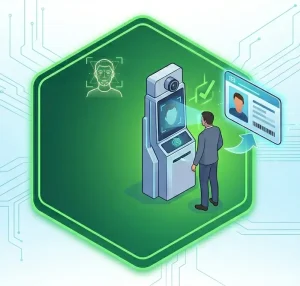
The field of biometric verification, especially facial recognition, is developing quickly. Facial recognition at kiosks enables hands-free, card-free identification verification in high-security settings, which is much harder to fake than a printed badge.

Smart Building & IoT Integration

To customize the visitor experience, visitor management systems are integrating with IoT infrastructure as buildings become smarter. Examples of this include automatically controlling meeting room lighting and temperature, directing guests using digital wayfinding displays, and providing access to smart lockers or amenities without human intervention.

Predictive Visitor Analytics

Visitor management is becoming more proactive rather than reactive. With the help of Predictive Analytics, it can forecast visitor volumes by time of day, day of week, or organizational event calendar. Over time, this data informs portfolio-level facility planning decisions.

Hybrid Workplace Visitor Policies

Visitor management systems are changing to handle varying on-site populations as hybrid work becomes more common. Now commonplace are features such as visitor capacity control, integration with desk booking systems, and dynamic visitor policies that change based on the number of employees in the building on a given day.


How Experion Can Help Build a Visitor Management System App?

Building a custom visitor management app that identifies specific security workflows, integrates with existing infrastructure, and scales with organizational growth is far more complex than implementing an off-the-shelf solution.

It demands strong expertise in web and mobile development, cloud architecture, security engineering, and UX design – capabilities that Experion brings through its experience in developing enterprise applications.


From First Visit to Full Audit Trail -Own Every Step ! Contact Experion


Conclusion

The visitor management system is no longer just a digital sign-in sheet. It is a critical platform that combines physical security, data compliance, and operational efficiency. Whether you’re deploying a cloud based visitor management system across a global enterprise, implementing a hospital visitor management system with strict patient privacy controls, or rolling out building visitor management systems for a mixed-use real estate portfolio, the principles are the same: automate the workflow, secure the data, integrate with existing systems, and create an experience that reflects well on your organization.

The best visitor management system is the one that fits your security requirements, scales with your growth, and operates reliably in the background – so that your visitors’ first impression of your organization is always professional and secure.

Web Application Development

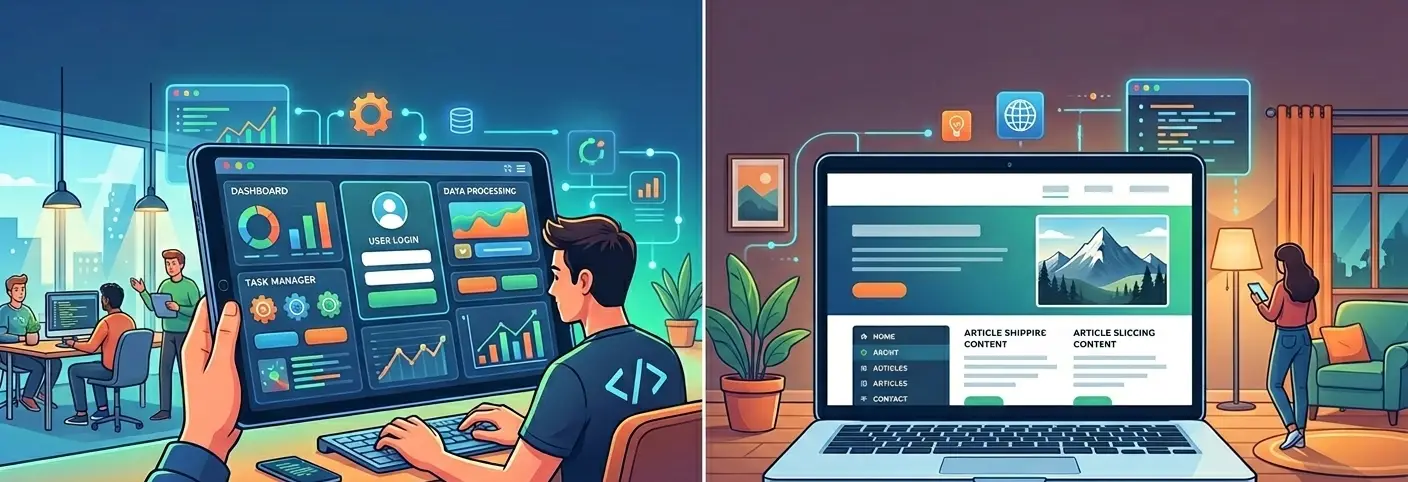
In simple terms, web application development is the process of building software applications that run on web browsers instead of being installed on individual devices. Unlike static websites that only display information, web apps allow users to interact, perform actions, process data, and complete transactions in real time.

Businesses today are investing heavily in web app development because traditional websites are no longer enough. Customers expect personalized dashboards, seamless transactions, real-time updates, and integrated services. Whether it is a CRM system, SaaS platform, customer portal, or enterprise workflow tool, web applications development has become central to digital transformation strategies.

Web applications improve scalability because they can be hosted on cloud infrastructure, accessed globally, and updated centrally without requiring user-side installations. For organizations pursuing digital transformation, enterprise web application development provides agility, operational efficiency, and faster innovation cycles.


Launch faster with secure, enterprise-ready web app development.


Key Takeaways

  • Web application development enables dynamic, interactive digital platforms.
  • Web apps are more scalable and flexible than traditional websites.
  • Custom web application development supports automation and innovation.
  • Enterprise web application development drives digital transformation.
  • Partnering with a professional web application development company ensures long-term success.


What is Web Application Development?

Web Application Development

Web Application Development refers to the development of web based application systems that operate through browsers using internet connectivity. These applications process data, support user authentication, integrate databases, and provide interactive interfaces.

Unlike static web pages, web applications development involves both frontend and backend engineering, database architecture, security layers, and hosting environments.

A web application development firm typically handles everything from UI design to backend architecture, API integration, and cloud deployment.

Web Application vs Website – What’s the Difference?

Web Application Development

Understanding the distinction between a website and a web application is critical.

Static vs Dynamic
Websites are typically static and informational. Web applications are dynamic and interactive.

User Interaction
Web apps allow user login, transactions, dashboards, and data manipulation. Websites mainly provide content.

Database Connectivity
Web applications connect to databases to store and retrieve user data.

Examples

  • CRM platforms
  • SaaS tools
  • Customer portals
  • Enterprise dashboards

When businesses need automation and functionality, they turn to web application development services instead of traditional website design.


Turn your idea into a high-performance web application.


Types of Web Applications

Web Application Development encompasses a wide range of application types, each designed to serve specific business needs, user experiences, and scalability requirements. Choosing the right type of web app depends on your industry, audience, functionality requirements, and long-term growth strategy.

Below is a deeper look at the major categories of web applications.

Static Web Apps

Static web applications are simple platforms that primarily display fixed content. They have minimal interactivity and typically do not rely heavily on databases or complex backend processing.

Characteristics include:

  • Basic informational interfaces
  • Limited user interaction
  • Faster development timelines
  • Lower infrastructure complexity

These are often used for landing pages, product showcases, or informational portals. While static apps are not suitable for complex workflows, they can be a starting point for businesses testing new ideas before investing in full-scale custom web application development.

Dynamic Web Apps

Dynamic web apps are data-driven platforms that adapt content based on user input and backend processing. These applications connect to databases, manage user authentication, and support real-time updates.

Examples include:

  • Customer dashboards
  • Online booking systems
  • Membership portals
  • CRM platforms

Dynamic applications are central to enterprise web application development because they support high levels of user engagement and operational functionality. Most modern web app development projects fall into this category.

Single-Page Applications (SPAs)

Single-Page Applications load a single HTML page and dynamically update content without refreshing the entire page. Frameworks like React, Angular, Vue, and Svelte are commonly used to build SPAs.

Benefits of SPAs include:

  • Faster user experience
  • Reduced server load
  • Seamless navigation
  • App-like interaction within browsers

SPAs are popular in SaaS platforms and enterprise dashboards where smooth performance is critical.

Multi-Page Applications (MPAs)

Multi-Page Applications load new pages from the server for each user action. This traditional model is still relevant for complex systems that require multiple distinct views.

MPAs are often used for:

  • Large enterprise systems
  • Content-heavy portals
  • Government or institutional platforms

They can offer better SEO performance and structured navigation for large-scale platforms.

E-commerce Applications

E-commerce web applications allow users to browse products, add items to carts, complete payments, and track orders. These applications integrate payment gateways, inventory systems, and CRM platforms.

Key components include:

  • Product catalog management
  • Secure checkout systems
  • Order tracking dashboards
  • Customer account management

Custom web application development services often build tailored eCommerce platforms for retail businesses seeking unique branding and scalability.

SaaS Applications

Software as a Service platforms are subscription-based web applications hosted on the cloud. Users access them through browsers without installing software.

Examples include:

  • Project management tools
  • Accounting platforms
  • HR management systems
  • Marketing automation tools

SaaS platforms are a core focus of many web application development companies because they offer recurring revenue models and scalable growth.

Micro-services Based Apps

Micro-services architecture divides applications into independent modules that communicate through APIs. Each module handles a specific function, such as authentication, billing, or analytics.

Advantages include:

  • Improved scalability
  • Faster feature deployment
  • Easier maintenance
  • Fault isolation

Enterprise web application development increasingly relies on micro-services for large, distributed systems.

Progressive Web Apps (PWAs)

Progressive Web Apps combine the reach of web apps with the functionality of mobile applications. They can work offline, send push notifications, and be installed on user devices.

Benefits include:

  • Mobile-like experience
  • Offline functionality
  • Lower development cost compared to native apps
  • Cross-platform compatibility

Many web application development service providers recommend PWAs for businesses seeking mobile accessibility without separate native app development.

Enterprise Web Applications

Enterprise web applications are large-scale systems designed to support complex corporate operations. These may include:

  • Supply chain management systems
  • Financial reporting platforms
  • Enterprise resource planning dashboards
  • Internal collaboration tools

Enterprise web application development requires robust architecture, high security standards, and integration with multiple internal systems.

Cloud Based Web Applications

Cloud based web applications are hosted on cloud infrastructure such as AWS, Azure, or Google Cloud. These platforms offer scalability, redundancy, and global accessibility.

Advantages include:

  • Elastic scaling
  • Automatic backups
  • Global content delivery
  • High availability

A modern web and application development company typically prioritizes cloud-native architecture to ensure resilience and performance.


Why is Web App Development Important for Businesses?

Web application development is no longer optional in a digitally competitive market. Businesses rely on web apps to automate processes, enhance customer engagement, and scale operations efficiently.

Scalability

Enterprise web application development enables systems to handle increasing user loads, transactions, and data volumes. Cloud-based architectures allow businesses to expand without rebuilding infrastructure.

Scalable web app development ensures:

  • Smooth performance during traffic spikes
  • Easy addition of new features
  • Expansion across geographies

Cost Efficiency

Unlike traditional desktop applications that require installation and updates on each device, web applications are updated centrally. This reduces IT maintenance costs and minimizes downtime.

Custom web application development also eliminates the need for licensing multiple software tools by consolidating features into a unified platform.

Cross-Platform Accessibility

Web applications run on browsers, making them accessible across desktops, tablets, and smartphones. This eliminates compatibility issues across operating systems.

Web and application development company solutions ensure consistent user experience across devices.

Centralized Updates

Updates in web applications are deployed server-side. Users automatically access the latest version without downloading patches or reinstalling software.

This ensures:

  • Faster feature rollouts
  • Reduced security vulnerabilities
  • Seamless user experience

Cloud Integration

Cloud integration allows web applications to connect with third-party services, APIs, analytics tools, and storage systems.

Benefits include:

  • Real-time data synchronization
  • Global access
  • Disaster recovery capabilities
  • Integration with AI and analytics platforms

Cloud-native web application development services empower businesses with flexibility and global reach.

In summary, web application development forms the backbone of digital transformation. From static apps to enterprise web applications and cloud based web applications, each type serves a specific strategic purpose. Investing in the right web app development approach ensures scalability, cost control, operational efficiency, and long-term competitive advantage.


Industry Use Cases of Web Application Development

Web and application development is used across industries:

  • Healthcare patient portals
  • Fintech dashboards
  • Retail eCommerce systems
  • Logistics tracking platforms
  • Education learning management systems

Custom web applications development allows organizations to address industry-specific challenges effectively.


How Does Web App Development Work (Programming Languages and Frameworks)?

Front-end Development

The frontend defines the user interface and experience. Frameworks include:

  • React
  • Angular
  • Vue
  • Svelte

These frameworks enable responsive UI/UX design.

Back-end Development

Backend systems handle:

  • Server-side logic
  • APIs
  • Database connectivity

Languages often used include Java, Python, .NET, and Node.js.

Database Management

SQL databases like MySQL or PostgreSQL are structured.
NoSQL databases like MongoDB handle flexible data models.

Deployment and Hosting

Cloud platforms like AWS, Azure, and Google Cloud enable application deployment. DevOps pipelines automate builds and updates.

At Experion Technologies, we combine robust backend engineering and intuitive frontend design to deliver high-performance web application development services tailored to enterprise needs.


Step-by-Step Enterprise Web Application Development Process

Web Application DevelopmentStep 1: Requirement Analysis

Stakeholder interviews and market research define scope and objectives.

Step 2: Planning and Architecture Design

Wireframes and technology stack selection are finalized.

Step 3: UI and UX Design

User-centric design ensures seamless experiences.

Step 4: Development

Frontend and backend coding take place simultaneously.

Step 5: Testing and QA

Step 6: Deployment

Application is hosted and launched.

Step 7: Maintenance and Optimization

Continuous monitoring and feature updates ensure scalability.


Build a scalable web app that grows with your business.


How to Implement Web Application Development for Your Business?

Implementing Web Application Development successfully requires more than just hiring developers and starting to code. It demands strategic clarity, technical alignment, financial planning, and the right execution model. Whether you are building an internal enterprise platform or launching a customer-facing SaaS product, a structured approach ensures long-term scalability and ROI.

Below is a detailed roadmap to guide your implementation journey.

Define Business Goals

Before initiating web app development, clearly define what you want the application to achieve. Every successful web application development service engagement starts with business clarity.

Ask key questions:

  • Is the goal to generate new revenue streams?
  • Are you aiming to improve operational efficiency?
  • Do you want to automate manual workflows?
  • Are you enhancing customer engagement?
  • Is digital transformation a strategic priority?

For example:

  • A logistics company may focus on operational automation and real-time tracking.
  • A retail brand may prioritize revenue growth through eCommerce web applications development.
  • A financial institution may emphasize compliance and secure transaction processing.

Clear goals help shape feature requirements, technical architecture, and scalability plans. In enterprise web application development, aligning business KPIs with technical milestones is critical for measurable success.

Choose the Right Technology Stack

Selecting the right technology stack directly impacts performance, scalability, security, and long-term maintainability.

Common stacks include:

MERN (MongoDB, Express, React, Node.js): Ideal for dynamic single-page applications and SaaS platforms.

MEAN (MongoDB, Express, Angular, Node.js): Suitable for structured enterprise-grade applications.

.NET: Widely used for enterprise web application development in corporate environments.

Java: Recognized for stability and scalability in handling complex backend systems.

Python: Popular for AI-powered web apps and rapid development cycles.

Your choice should depend on:

  • Project complexity
  • Expected user load
  • Security requirements
  • Integration needs
  • In-house expertise

A professional web application development company can help evaluate your technical requirements and recommend the most appropriate stack. The right technology foundation ensures smooth development of web based application systems that scale with your business.

Decide Between In-House vs Outsourcing

One of the most strategic decisions in web and application development is choosing between building an internal team or partnering with a custom web application development company.

In-House Development
Advantages include direct control, long-term team ownership, and internal knowledge retention. However, it requires recruitment, training, and infrastructure investment.

Outsourcing to a Web Application Development Firm
Partnering with experienced web application development companies can accelerate timelines and reduce hiring overhead. It provides access to specialized expertise, structured project management, and proven development methodologies.

Outsourcing is often cost-effective for startups and mid-sized enterprises that need enterprise web application development but lack internal technical resources.

A hybrid model is also common, where strategic oversight remains in-house while technical execution is handled by custom web application development services providers.

Budget Planning

Financial planning is a critical component of successful web app development.

A realistic budget should account for:

Design Costs: UI/UX research, wireframing, prototyping, and visual design.

Development Costs: Frontend, backend, API integration, database setup, and security implementation.

Infrastructure Costs: Cloud hosting, DevOps pipelines, monitoring tools, and backup systems.

Testing and Quality Assurance: Functional testingperformance testing, and security audits.

Maintenance and Optimization: Bug fixes, feature updates, scaling improvements, and ongoing support.

For enterprise web application development, budgeting must also consider compliance requirements, data security frameworks, and integration complexity.

It is important to think beyond initial launch costs. Long-term sustainability depends on ongoing optimization and support. A reliable web and application development company will provide transparent cost estimates and phased investment planning.

Additional Implementation Considerations

While the four steps above form the foundation, successful web applications development also requires:

  • Clear project governance
  • Agile or DevOps methodology adoption
  • Continuous stakeholder communication
  • Scalable cloud deployment strategy
  • Security-first architecture

Implementing custom web applications development is not just a technical project. It is a strategic business initiative that impacts workflows, customer experience, and competitive positioning.

Final Thought

Implementing Web Application Development for your business requires alignment between strategy, technology, and execution. By defining clear goals, choosing the right technology stack, selecting the appropriate development model, and planning your budget carefully, you create a strong foundation for digital success.

Partnering with an experienced web application development services provider ensures that your web and application development journey delivers measurable impact, scalability, and long-term value.


How Much Does Web Application Development Cost?

Regional Breakdown

  • USA and UK tend to have higher development costs.
  • India offers cost-effective web application development services.
  • Middle East and Australia fall in mid-to-high ranges.

Cost Factors

  • Complexity
  • Features
  • Security requirements
  • Integration needs

Estimated Cost Ranges

  • Basic web app: 20,000 to 50,000 USD
  • Mid-level SaaS: 50,000 to 120,000 USD
  • Enterprise application: 120,000 USD and above


Latest Trends in Web Application Development

Web Application Development

  • AI-powered web apps
  • Low-code integration
  • Cloud-native development
  • Serverless architecture
  • Cybersecurity-first development
  • Voice and gesture navigation
  • Sustainable web development practices


Common Challenges in Web Application Development

Even with a well-defined roadmap, Web Application Development comes with technical and operational challenges. Whether handled in-house or by a web application development company, understanding these risks early helps businesses design scalable and resilient systems.

Scalability Issues

One of the most frequent problems in web app development is underestimating growth. Applications may perform well during initial launch but struggle as user traffic increases.

Scalability challenges often arise due to:

  • Poor database design
  • Monolithic architecture
  • Limited server capacity
  • Inefficient API calls

In enterprise web application development, scalability must be built into the architecture from the beginning. Cloud based web applications and micro-services models help manage high user loads and expanding feature sets without system breakdowns.

If scalability is ignored, businesses face downtime, degraded performance, and poor customer experience.

Security Vulnerabilities

Security is a critical concern in development of web based application platforms. Web apps often handle sensitive user data, financial transactions, or enterprise information.

Common security vulnerabilities include:

  • SQL injection attacks
  • Cross-site scripting
  • Weak authentication mechanisms
  • Insecure API endpoints
  • Poor data encryption practices

Custom web application development services must implement secure coding standards, encryption protocols, multi-factor authentication, and regular penetration testing. Enterprise web applications especially require compliance with regulations such as GDPR and HIPAA.

A professional web application development firm prioritizes security from the architecture stage rather than treating it as an afterthought.

Performance Bottlenecks

Slow-loading applications frustrate users and increase bounce rates. Performance bottlenecks may stem from:

  • Heavy frontend scripts
  • Inefficient backend queries
  • Unoptimized images or assets
  • Lack of caching mechanisms

In web applications development, performance optimization includes database indexing, content delivery networks, code refactoring, and load balancing.

Performance is directly linked to user satisfaction and revenue, particularly in SaaS and eCommerce web app development.

Poor UI and UX

Even technically robust applications can fail if the user interface is confusing or unintuitive. Poor navigation, inconsistent design, and lack of accessibility reduce engagement.

Successful web and application development prioritizes user research, wireframing, usability testing, and accessibility compliance. Custom web applications development must align design with user behavior and business goals.

A user-centric design approach improves adoption rates and customer retention.

Integration Failures

Modern web applications rarely operate in isolation. They must integrate with:

  • CRM systems
  • ERP platforms
  • Payment gateways
  • Third-party APIs
  • Analytics tools

Integration failures occur when systems use incompatible formats, outdated APIs, or poor documentation.

Enterprise web application development demands API-first design and standardized data exchange protocols. Without proper integration planning, businesses face data silos and operational inefficiencies.


Best Practices for Successful Web Applications Development

Overcoming these challenges requires disciplined execution and adherence to industry best practices. A structured approach ensures long-term performance, scalability, and security.

Mobile-First Design

With the majority of users accessing digital platforms via mobile devices, web app development must prioritize responsive and mobile-friendly interfaces.

Mobile-first design ensures:

  • Seamless user experience across devices
  • Faster load times
  • Improved search engine visibility
  • Higher user engagement

Whether building SaaS platforms or enterprise web application development projects, responsive design is no longer optional.

API-First Architecture

An API-first approach means designing application interfaces before building frontend or backend components. This ensures modularity and seamless integration.

Benefits include:

  • Easier third-party integration
  • Faster feature expansion
  • Better support for micro-services architecture
  • Scalability across platforms

API-first design is particularly important for custom web application development projects that require integrations with multiple enterprise systems.

DevOps Adoption

DevOps practices integrate development and operations teams to streamline deployment cycles.

Key DevOps practices include:

  • Continuous integration and continuous deployment
  • Automated testing
  • Infrastructure as code
  • Monitoring and logging systems

Adopting DevOps reduces deployment errors, accelerates release cycles, and enhances collaboration in web application development services projects.

Continuous Testing

Testing should not be limited to the final phase of development. Continuous testing throughout the lifecycle helps detect bugs early and reduce costly fixes later.

Testing includes:

Enterprise web application development relies heavily on automated testing tools to maintain quality at scale.

Performance Optimization

Optimizing performance involves:

  • Code refactoring
  • Efficient database queries
  • Load balancing
  • Caching strategies
  • Content delivery networks

Cloud based web applications benefit from auto-scaling and distributed infrastructure to maintain consistent performance under high traffic.

Security Compliance such as GDPR and HIPAA

Compliance is essential for businesses operating in regulated industries. Web application development services must incorporate:

  • Data encryption at rest and in transit
  • Role-based access controls
  • Audit logs
  • Secure authentication protocols

Enterprise web applications handling healthcare or financial data must align with GDPR, HIPAA, or other regional regulations.

Final Perspective

Web Application Development is a strategic investment, but it comes with technical complexity. Scalability challenges, security risks, performance bottlenecks, poor user experience, and integration issues can derail even promising projects.

By following best practices such as mobile-first design, API-first architecture, DevOps adoption, continuous testing, performance optimization, and strict security compliance, businesses can ensure that their web applications development initiatives deliver sustainable value.

Partnering with an experienced web and application development company further strengthens execution, reduces risk, and accelerates time to market.


How Custom Web Application Development Differs from Traditional Web App Development?

Custom web application development focuses on tailored solutions built around specific business needs. Unlike generic templates, custom web application development services provide flexibility, scalability, and unique competitive advantages.

A custom web application development company builds platforms aligned with workflow, compliance requirements, and industry-specific use cases.


Why Partner with a Professional Web Application Development Services Company?

  • Technical expertise
  • Faster time to market
  • Cost efficiency
  • Post-launch support
  • Dedicated project management

Partnering with an experienced web application development firm ensures reliability and long-term performance.


Transform your digital vision into a scalable web application today.


How Experion Can Help in the Development of Web Based Application?

As a web and application development company with global expertise, Experion delivers custom web application development services across industries.

Case Study

A leading logistics enterprise partnered with Experion to develop web based application solutions that streamlined shipment tracking and automated reporting. The result was improved operational efficiency and reduced processing time.


Conclusion

Web Application Development is no longer optional for businesses seeking digital transformation. From enterprise web application development to custom web applications development for startups, web apps enable automation, scalability, and innovation.

Investing in web application development services positions businesses for long-term success in an increasingly competitive digital environment.

At Experion Technologies, we combine strategic thinking and advanced engineering to deliver enterprise-grade web application development that drives measurable business growth.